Kaizer adjusts the weight of each set week by week based on how the client is doing, and saves you the work of recalculating by hand.
It leans on how they actually train
It uses the client's history on that movement, the average of their last three 1RMs and the RIR they've been closing sets with. One weak session doesn't shift your whole plan.
It's trained on evidence
It follows the literature on RIR and effort-based training, not a fixed rule of adding two kilos a week.
The last word is yours
It turns on and off per client from their Settings tab, and any value it proposes you can change before they see it.
It works with fixed reps
Sets by time, by distance or with a written range move to the next week with what the client logged, with no automatic adjustment.
The more effort your client logs, as RIR or RPE, the better it adjusts. In Automations you choose whether the app asks for it at the end of each exercise, after each set or never.
Common questions
Automatic weight suggestion
When you add an exercise that uses weight, Kaizer can suggest a working value calculated from the client's history on that movement: it estimates their strength based on what they've been lifting and proposes the weight for the sets and reps you entered, rounded to the exercise's increment (by default 1 kg or 2.5 lb).
The suggestion appears as a tentative number. If it works for you, you confirm it; if not, you type your own.
For new exercises or clients without history on that movement, the field stays blank: there it's better to enter the weight by hand based on your assessment.
Automatic routine delivery and updates
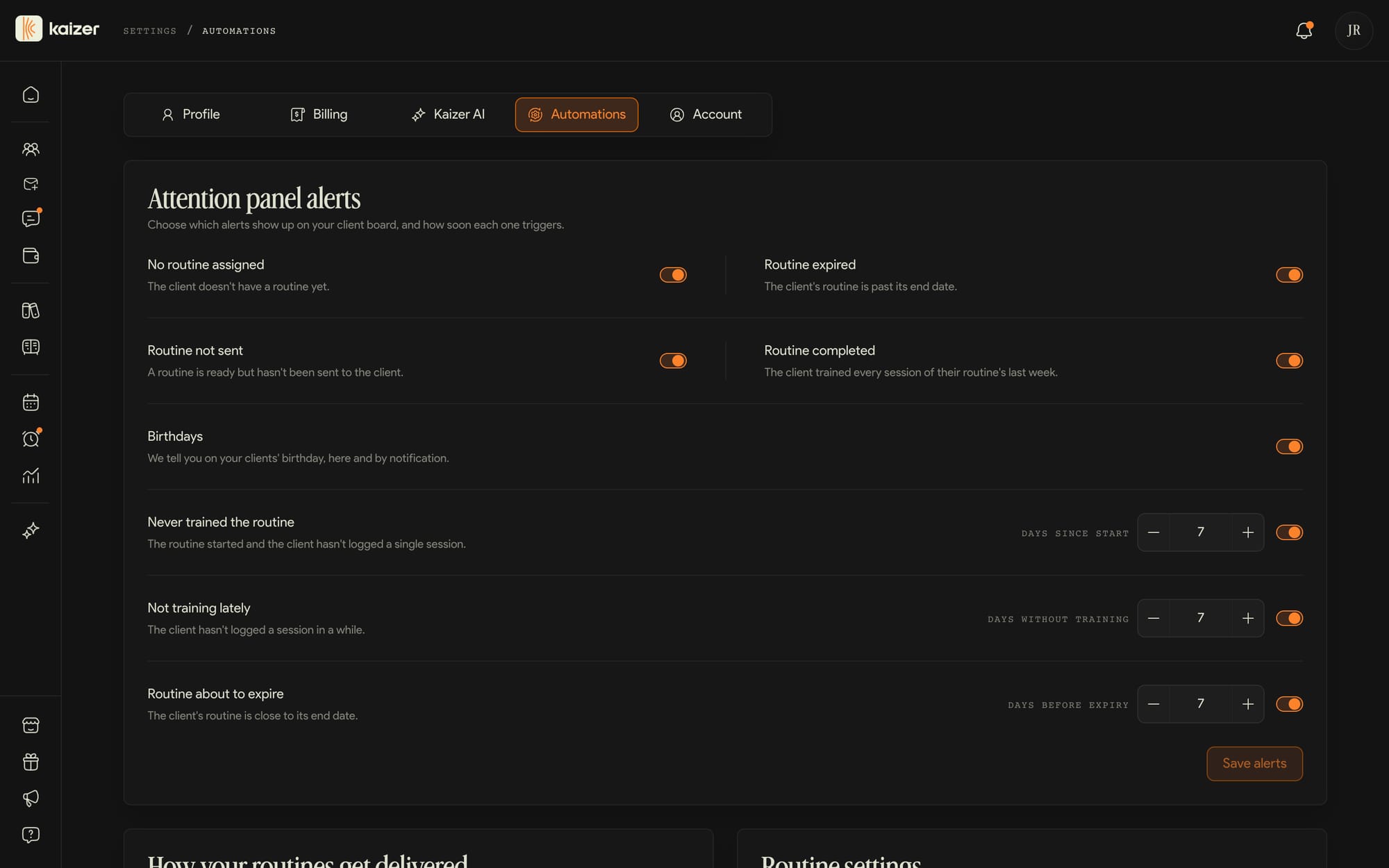
Review trigger, scope and outcome before activating a rule. The How your routines are delivered card in Settings → Automations holds a single decision: whether AI-generated routines are sent to the client automatically. Say no and they stay pending for you to review and send yourself.
The Routine settings card covers what happens to routines already running. Automatic progressive overload adjusts weight per set and per week based on the client's progress, goal and calculated 1RM. Automatic archiving files the routine as soon as the client completes their last session, and new accounts start with this off. The RIR question asks the client how many reps they had left in reserve at the end of each exercise.
That same card holds the Default scope: the option preselected when you add, delete or duplicate something in a multi-week routine. If you almost always work on the whole block, leave it on All weeks and save yourself the click every time.
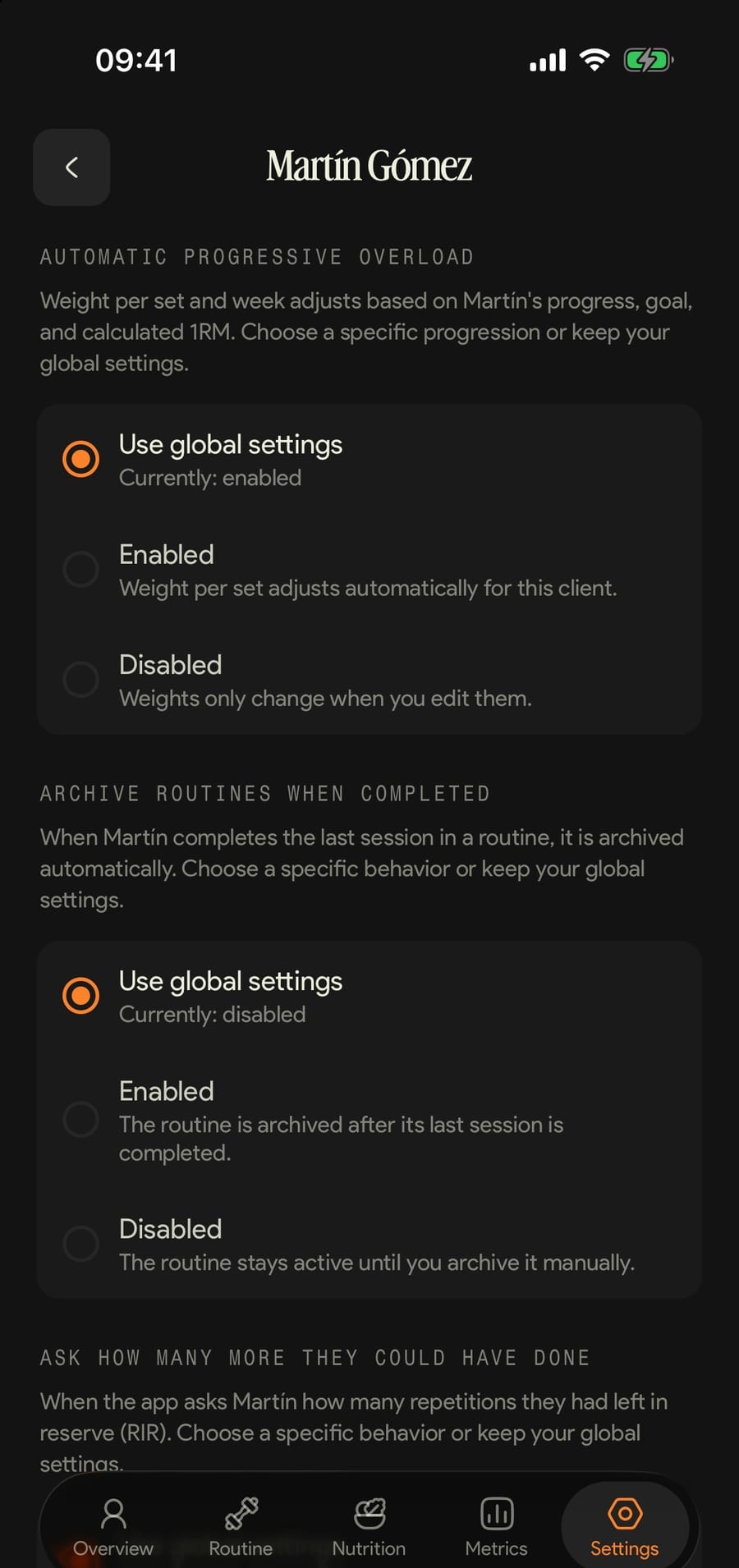
Those three switches are your default for everyone, but each client can differ: from the client's settings in Clients you can override any of the three or leave it inheriting your global configuration.
Kaizer adjusts the weight of each set week by week based on how the client is doing, and saves you the work of recalculating by hand.
It leans on how they actually train
It uses the client's history on that movement, the average of their last three 1RMs and the effort they've been closing sets with. One weak session doesn't shift your whole plan.
It's trained on evidence
It follows the literature on RIR and effort-based training, not a fixed rule of adding two kilos a week.
The last word is yours
It turns on and off per client from their Settings tab, and any value it proposes you can change before they see it.
It works with fixed reps
Sets by time, by distance or with a written target move to the next week with what the client logged, with no automatic adjustment.
The more effort your client logs, the better it adjusts. In More, Customization, you choose whether the app asks for it at the end of each exercise, after each set or never.