
The best FitBudd alternatives in 2026.
FitBudd is built around having your own app, but it charges per extra client: 15 clients on Starter come to USD 67 a month, and the own app starts at USD 149 plus a USD 75 setup fee. These are the alternatives, with what each one costs.
What each option costs.
Monthly price for 15 and 50 clients, what the cheapest paid plan includes and which languages the client app speaks, from each product's official site.
 FitBuddKahunasMy PT HubTrainerizeEverfitFree plan or trial14-day trial30-day trial14-day trial30-day trialFree for 1 client; 30-day trialFree up to 5 clientsCheapest paid planUSD 5/mo, 3 clients (Basic)USD 15/mo, 2 clients (Starter)USD 35/mo, 25 clients (Essentials)USD 25/mo, 3 clients (Starter)USD 10/mo, 2 clients (Grow)USD 19/mo, 5 clients (Pro)15 clientsUSD 19/mo (Starter)USD 67/mo, computed (Starter)USD 35/mo (Essentials)USD 59/mo (Premium, unlimited)USD 50/mo (Pro 15)USD 49/mo (Pro, 20 clients)50 clientsUSD 49/mo (Pro)USD 139/mo, computed (Pro)USD 69/mo (Growth)USD 59/mo (Premium)USD 135/mo (Pro 50)USD 95/mo (Pro, 50)Branded appNot on trainer plansOwn app on Super Pro: USD 149/mo + USD 75Own app on Ultimate (USD 99/mo)USD 95 one-time; in the stores, USD 145/moUSD 169 setup on Pro; own app on StudioCustom branding on Pro; own app on EnterpriseClient paymentsTracks payments; does not process themYes: Stripe, PayPal and RazorpayStripe and PayPal, no commissionYes, includedVia Stripe, USD 10/mo add-onUSD 9/mo add-onAI workout builderYes, from StarterYesNot listed; its AI is Health ScoreYes, from PremiumAI Workout Builder, from the Grow planYes, AI Workout BuilderClient app languagesSpanish, English and PortugueseSix languages, Spanish and Portuguese includedEnglish onlyEnglish onlyEnglish onlySix languages, Spanish included; no Portuguese
Monthly list prices before tax, checked on September 26, 2026 on each product's pricing page; check each source for annual discounts and regional prices. Where no plan exists for the exact count, the first plan that covers it is shown. Harbiz prices in euros. "Computed" adds the per-client fee FitBudd publishes. Languages come from each app's App Store listing unless noted.
Why look for a FitBudd alternative.
FitBudd has a clear pitch: your app on the App Store and Google Play under your brand (Super Pro plan), your own website and direct payments through Stripe, PayPal or Razorpay. The pricing model is what gets debated most: Starter costs USD 15 a month for 2 clients plus USD 4 for each extra client, Pro costs USD 79 for 20 plus USD 2 for each extra, and the appointments, team and on-demand modules cost USD 50 a month each. If you do not need your own app in the stores, you pay for something you do not use.
Updated: September 27, 2026
Sources and methodology.
We compare each product using its public pricing and official documentation. Prices, limits, and features can change; these sources were checked on the date shown.
Reviewed: 2026-09-26

Compare it yourself in a demo.
One by one.
Each alternative with its short pitch, concrete pros and cons, and a deeper link where it applies.
Kaizer
KaizerFor coaches who care more about programming than about an app with their name on it: AI routines, weight and rep adjustments after every logged session and nutrition included, with a flat price per client tier.
See detailsPros- Flat price per tier: USD 19 for up to 15 clients and USD 49 for up to 50, with no per-client fee.
- AI routines and load adjustments after every logged session.
- Nutrition and payment tracking included.
- Client app in Spanish, English and Portuguese.
Cons- No branded app on the trainer plans: your clients use the Kaizer app.
- Does not process payments: it tracks them, but the money is collected outside Kaizer.
- No website of your own; your public profile lives on the Kaizer marketplace.
Kahunas
The cheapest own app in the stores in the group: USD 99 a month on Ultimate, with unlimited clients.
Pros- Own app on the App Store and Google Play on Ultimate (USD 99 a month).
- Unlimited clients on Ultimate.
- Stripe and PayPal payments with no commission.
- 4.9 out of 5 on Capterra.
Cons- App in English only.
- Lists no AI routine generator.
- 14-day trial and no free plan.
My PT Hub
A UK platform with a branded app for a one-time fee or with its own store listing, and unlimited clients from USD 59.
Pros- Branded app for a one-time USD 95, or in the stores for USD 145 a month.
- Unlimited clients for USD 59 a month.
- Payments included on every plan.
Cons- Client app in English only.
- Check-Ins AI is billed separately (USD 12 a month).
- The Starter plan only covers 3 clients.
Trainerize
The widest add-on catalog, with an own app in the stores on its Studio plans.
Pros- Own app in the stores on the Studio plans.
- Free plan for 1 client and a 30-day trial.
- AI Workout Builder, included from the Grow plan.
Cons- USD 135 a month for 50 clients.
- Client app in English only.
- Your brand inside the Trainerize app costs a USD 169 setup fee on Pro.
Everfit
To start without paying: free for up to 5 clients, with AI Workout Builder and a Spanish client app.
Pros- Free for up to 5 clients.
- AI Workout Builder.
- Client app in Spanish.
Cons- An own app in the stores only on Enterprise.
- Payments and meal plans are add-ons.
- The client app is not available in Portuguese.
A use case you can verify.
Natal Gym Center uses Kaizer to organize Natal Online, its remote strength program. Its founder explains the move from spreadsheets and PDFs to delivering plans through the app. This is a usage account, not evidence of migration from the products compared or a promise of results.
A training plan inside Kaizer.
Weeks, sessions and exercises in the dashboard trainers use.
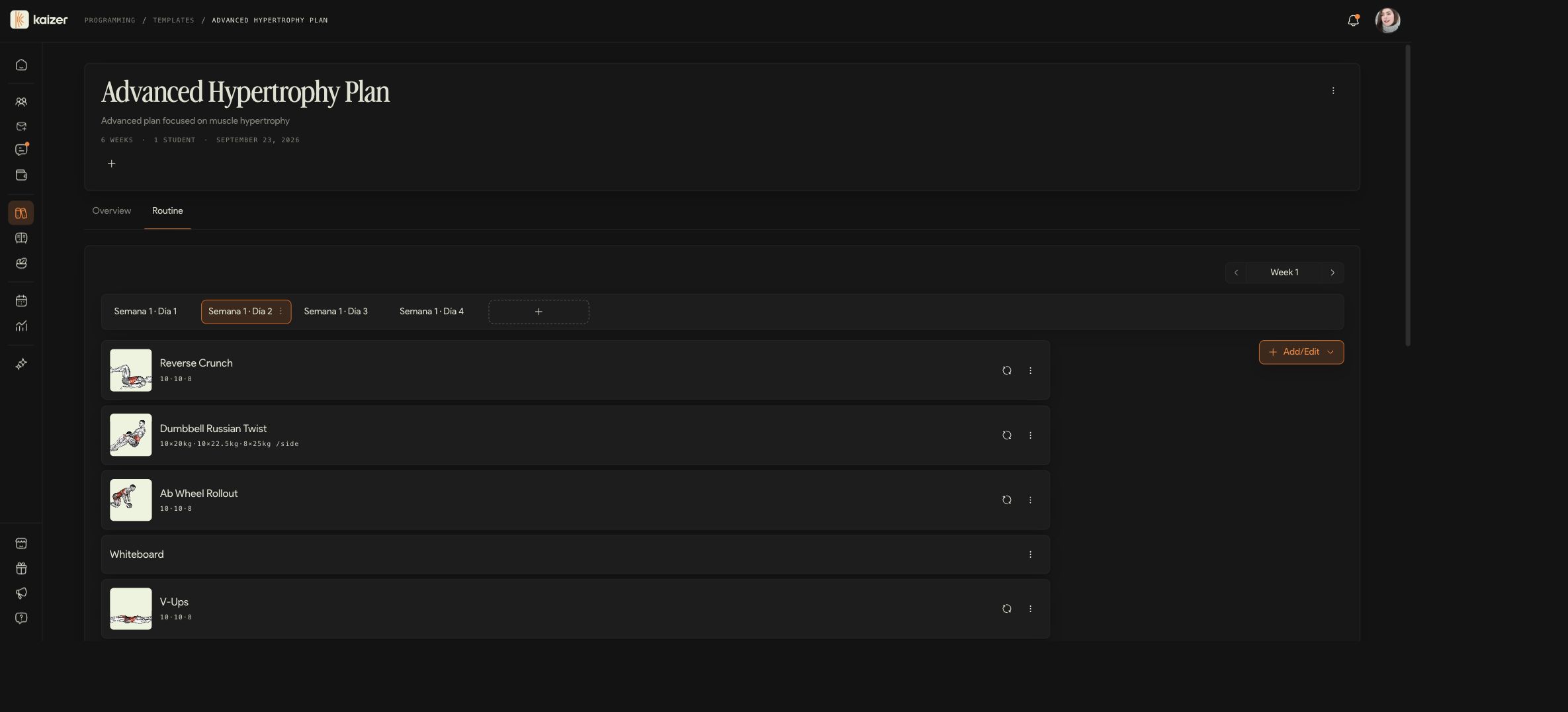
Actual product screenshot, captured on September 27, 2026 in a local demo account. English interface and sample content. This is not a recommended workout or a client's result.
View full screenshotWhen staying with FitBudd makes sense.
If your business depends on having your own app in the stores, with your website and direct payments, FitBudd handles it in one place, with a client app in six languages, Spanish and Portuguese included. If you already paid the setup fee and your clients know your app, switching has a real cost.
How to choose.
If programming matters more than an app with your name, start with Kaizer. If you want your app in the stores for less, Kahunas includes it at USD 99 a month. If you have many clients and work in English, My PT Hub is unlimited from USD 59. If you need every add-on, Trainerize. And if you want to start for free, Everfit.
Moving over takes an afternoon, not a month.
You bring what you already have, your clients join with a link, and the plan carries on where it was.

You upload the routine you already have.
PDF, Word, Excel, CSV, text or a photo. Kaizer reads the exercises, sets and loads, and you fix whatever needs fixing.

You invite your clients with a link.

They train, and the plan adjusts on its own.
Frequently asked questions about FitBudd alternatives.
On monthly billing, Starter costs USD 15 for 2 clients plus USD 4 per extra client; Pro, USD 79 for 20 plus USD 2 per extra; and Super Pro, with your own app, USD 149 for 20 plus USD 2 per extra and a USD 75 setup fee. Appointments, team and on-demand content cost USD 50 a month each. There is a 30-day trial.
If programming matters more than an app with your name, start with Kaizer. If you want your app in the stores for less, Kahunas includes it at USD 99 a month. If you have many clients and work in English, My PT Hub is unlimited from USD 59. If you need every add-on, Trainerize. And if you want to start for free, Everfit.
Yes. For 15 clients Kaizer costs USD 19 a month against about USD 67 for FitBudd's Starter with its per-client fee, and for 50 clients USD 49 against about USD 139 on Pro. These are monthly list prices, checked on September 26, 2026.
Yes. You upload the routines you already have as a PDF, Word, Excel, CSV or text file, or a photo; Kaizer reads the exercises, sets and loads, and you fix whatever needs fixing. Your clients join with a link, and the team guides you through onboarding and initial setup.
Kahunas includes it on Ultimate for USD 99 a month; My PT Hub charges a one-time USD 95 inside its app, or USD 145 a month with its own store listing; Trainerize offers it on its Studio plans. Kaizer does not offer a branded app on the trainer plans.
With 15 clients on Starter, USD 15 plus 13 extra clients at USD 4 comes to USD 67 a month. With 50 on Pro, USD 79 plus 30 extra at USD 2 comes to USD 139. That is the math with the prices FitBudd publishes; Kaizer costs USD 19 and USD 49 for the same tiers.
FitBudd's client app is available in six languages, Spanish and Portuguese included, per the App Store. FitBudd does not state the coach dashboard's language. Kaizer runs the dashboard and the client app in Spanish, English and Portuguese.
Everfit is free for up to 5 clients and Trainerize for 1. FitBudd offers a 30-day trial. Kaizer offers a 14-day trial and its cheapest plan costs USD 5 a month for 3 clients.
On September 26, 2026, on each product's official pricing page. Prices change, so confirm them on each vendor's site before you decide. We review this comparison every three months.
Other alternatives lists.
Evaluating several tools? Take a look at these listings too.